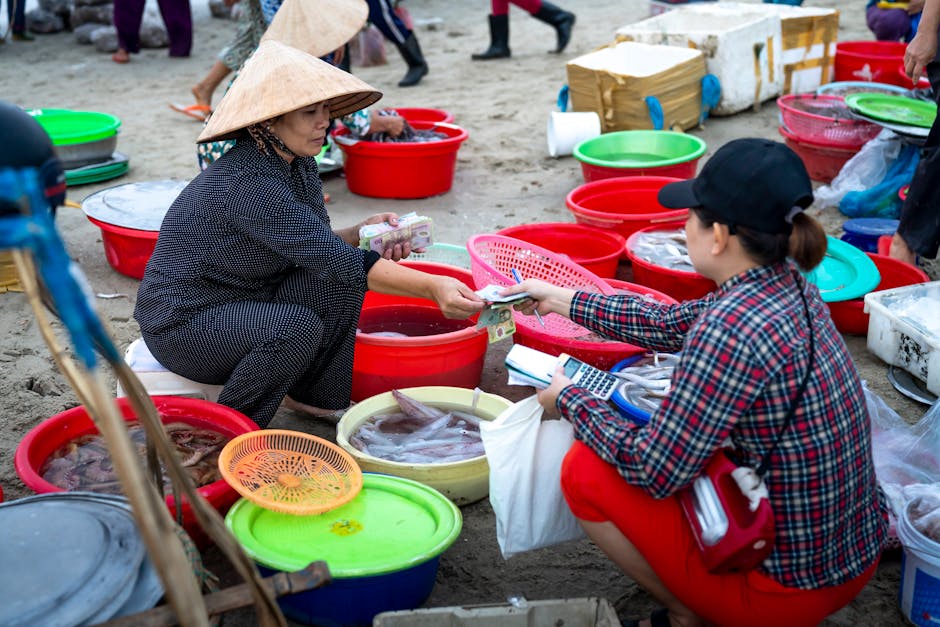
Street food vendors across Vietnam accept VietQR payments. You scan the vendor's QR code with a compatible app, enter the amount, and confirm. Foreign cards and international wallets do not work for this, but LocalPay lets you pay any VietQR vendor using your Visa, Mastercard, Apple Pay, or Google Pay to top up.
Street food is where you will spend most of your meal budget in Vietnam, but foreign Visa and Mastercard do not work at the banh mi cart or the pho stall. Most street vendors accept QR payments through VietQR, Vietnam's national QR standard, but you need a way to connect to it without a Vietnamese bank account.
Do street food vendors in Vietnam accept QR payments?
Yes. Most street food vendors that accept electronic payment use VietQR. You will see a laminated QR code on the cart, taped to the wall, or displayed on the vendor's phone.
VietQR is managed by the State Bank of Vietnam and works across 40+ Vietnamese banks and domestic wallets. A vendor only needs one QR code, and it works regardless of which app you use to pay.
Adoption surged 150% in 2025. The same QR system works at coffee carts, banh mi stands, fresh juice vendors, pho restaurants, and night markets across Hanoi, Ho Chi Minh City, Da Nang, and smaller cities.
Why do foreign cards not work at street vendors?
Foreign Visa, Mastercard, Apple Pay, and Google Pay only work at NFC terminals. Street vendors do not have those terminals.
VietQR runs on Vietnamese bank accounts and domestic apps. Your foreign card cannot connect to it directly because the payment rails are different. International card networks process through banks overseas; VietQR settles domestically through NAPAS.
This is not a street vendor problem. It is the same everywhere in Vietnam that relies on QR instead of card terminals: taxis, markets, small restaurants, local services.
Can tourists use MoMo or ZaloPay to pay street vendors?
Not easily. MoMo requires a Vietnamese phone number and a Vietnamese bank account or domestic card to top up. ZaloPay requires a Vietnamese ID and phone number.
From December 2025, new e-wallet registrations in Vietnam require biometric verification under Circular 41/2025. Even if you could complete KYC with a passport, topping up remains difficult without a local bank account.
Standard Vietnamese bank accounts require a long-term visa, work permit, or Temporary Residence Card. Tourists on 45-day visa exemptions or 90-day e-visas cannot open them.
How does LocalPay work for street food payments?
LocalPay is a non-custodial wallet that connects your foreign card or digital wallet to VietQR. You top up using Visa, Mastercard, Apple Pay, or Google Pay. Then you scan any VietQR code and pay.
You do not need a Vietnamese bank account, Vietnamese SIM card, or Temporary Residence Card. Download the app from the App Store or Google Play, add funds, and start paying.
It works at every street vendor that displays a VietQR code: banh mi carts in Hoi An, coffee stands in Hanoi's Old Quarter, pho stalls in District 1, juice vendors at Ben Thanh Market.
What if the vendor does not display a QR code?
If you do not see a QR code, ask the vendor. Many keep the code on their phone or in a drawer and will show it when you are ready to pay.
Some very small operations are still cash-only. These are increasingly rare in cities and tourist areas, but you may encounter them in rural markets or at older vendors who have not adopted electronic payment.
When a vendor accepts electronic payment at all, it is almost always VietQR. There is no such thing as a vendor that takes cards but not QR in Vietnam.
Is it safe to pay street vendors with QR codes?
Yes. The QR code itself is just the vendor's bank account details encoded. Scanning it does not transfer money automatically.
You confirm the amount and approve the payment in your app. The transaction is processed through NAPAS, the same network Vietnamese banks use for domestic transfers.
The vendor cannot change the amount after you scan. If the price seems wrong, do not confirm the payment. Ask the vendor to clarify before you approve.
“Street food vendors across Vietnam accept VietQR. You just need a way to connect to it without a Vietnamese bank account.”
Tips for Paying Street Vendors in Vietnam
- Check the price before you scan. Street vendors often do not display prices, so confirm the total in Vietnamese dong before you open the payment app.
- Make sure your phone battery stays charged. You cannot pay if your phone is dead, and street vendors will not have a charger for you.
- Save a screenshot of your last few payments. If there is any confusion about whether you paid, the transaction record in your app is proof.
- Small vendors appreciate if you confirm the amount out loud in Vietnamese. The numbers are not hard: 'hai muoi ngan' is 20,000 dong, 'nam muoi ngan' is 50,000.
- Top up LocalPay at your hotel or a cafe with good wifi. Do not try to add funds for the first time while standing at a busy food cart.
Street food is the best part of eating in Vietnam, and you do not need cash to enjoy it. Every vendor that accepts electronic payment uses VietQR, and LocalPay connects your foreign card or wallet to it.
Download LocalPay, top up with your Visa, Mastercard, Apple Pay, or Google Pay, and start scanning QR codes. You will be paying for banh mi and coffee like a local within minutes.
Frequently asked questions
Not directly. Apple Pay only works at NFC terminals, which street vendors do not have. You can use Apple Pay to top up LocalPay, then use LocalPay to scan the vendor's VietQR code.
Not with LocalPay. Vietnamese e-wallets like MoMo and ZaloPay require a local phone number, but LocalPay does not. You can use your foreign number.
Banh mi costs 15,000-25,000 VND. A bowl of pho is 30,000-50,000 VND. Coffee is 15,000-30,000 VND. Fresh juice is 20,000-40,000 VND. Prices are higher in tourist areas and lower in local neighbourhoods.
Nothing transfers until you enter the amount and confirm. If you scan the wrong code, close the payment screen and scan the correct one. Always check the recipient name on the payment screen before you approve.